1. Introduction
(a) End Goal
The goal of HECTUR (Head-Eye Control and Tracking for UR7e) is to develop an accessible, non-invasive human-robot interface that allows users to control a robotic manipulator using head gestures, eye blinks, and facial movements. The system enables users–particularly individuals with limited limb mobility–to teleoperate a UR7e robotic arm using only a standard webcam and computer vision, without relying on expensive prosthetics or neural-based interfaces. The project aims to translate intuitive facial and head movements into safe, real-time, velocity-based robotic control, suitable for performing simple, day-to-day manipulation tasks.
(b) Interesting Problems
We were interested in this project because it tackles a real-world accessibility problem using affordable equipment by combining computer vision and robotic control. We had to figure out how to extract a 3D head pose and facial state from a 2D live video captured by a simple monocular RGB camera. Then, we had to ensure that noisy, unintentional, instinctive actions were filtered and smoothed. Lastly, with limited measurable DOF, we had to design an intuitive yet capable control system with quality-of-life features for common everyday tasks.
Key Challenges:
- Extracting reliable 3D head pose information from a monocular RGB camera
- Mapping noisy, low-DOF human gestures into meaningful multi-DOF robot motion
- Ensuring safety and stability in velocity-based teleoperation
- Designing a state-based control scheme to compensate for limited sensing fidelity
- Differentiating intentional gestures (blinks, mouth open) from natural human behavior
- Implementing checkpoint poses to reduce redundant movements using IK
(c) Real-World Applications
- Assistive robotics for individuals with motor impairments
- Teleoperation in hazardous or constrained workspaces
- Hands-free robotic interfaces in medical or industrial settings
2. Design
(a) Design Criteria
Our project must be able to sense, plan, and actuate. We wanted our robot to be able to detect head and facial gestures reliably and use that as human input to safely teleoperate the robot arm. For planning, we designate a checkpoint that the robot can automatically return to, both on command. We also want to be able to recenter (adjust the zero state) of the user's head on command and emergency stop the arm on command.
(b) Design Choice
The system uses MediaPipe Face Mesh to track 468 facial landmarks and compute head yaw, pitch, and roll; eye aspect ratio for blink detection; and mouth openness as a discrete command (either checkpoint saving/returning or gripper toggle). These signals are processed through a ROS2-based pipeline consisting of a sensing node (head_pose_blink_node), a mapping node (head_teleop_mapper_node), and a robot control node (facemesh_ur7e_control_node). Processing includes applying a significant deadzone around the neutral head and facial state, then smoothing out the signal and filtering any estimations.
Control Mappings
State #1:
| Human Action | Robot Response |
|---|---|
| Look Up & Down | Base Link Pitch |
| Look Left & Right | Base Link Yaw |
| Mouth Open (1st open) | Save waypoint |
| Mouth Open (Subsequent open) | Return to waypoint saved by first open |
State #2:
| Human Action | Robot Response |
|---|---|
| Look Up & Down | Extend/Retract (rotating the Elbow and baseline pitch angles to extend and retract) |
| Look Left & Right | End Effector Roll |
| Mouth Open | Toggle Gripper |
Eye-Blink Commands (3 seconds):
| Blink Type | Action |
|---|---|
| Left | Stop |
| Right | Reset Frame |
| Both | Switch States |
To return to a waypoint, knowing the goal end-effector pose and the current joint state, we compute the inverse kinematics and use that to form a trajectory via MoveIt.
(c) Design Choices & Trade-offs
- Velocity-based control instead of position control for smoother, safer, and more precise motion. We did not want the robot to move at a high speed spontaneously in the case that we fail to catch a noisy measurement.
- State-based control scheme: Since we can only detect limited facial states, we designated one of the discrete inputs to swap between 2 states and overload the mappings to allow for more DOF on the robot arm. The trade-off is that it will increase the cognitive load on the user's side.
- Discrete binary signals for blink and mouth movements since they are harder to control precisely. The trade-off is that we can't directly use them to control the robotic arm movements, so we lose potential degrees of freedom, but we can use them for other necessary tasks/features.
(d) Impact on Real Engineering Criteria
- Robustness: Dead zones, filtering, and state separation improve stability
- Durability: Software-only interface reduces mechanical wear
- Efficiency: Lightweight CV model runs in real time
- Safety: Emergency stop, motion thresholds, and conservative gains prioritize user and robot safety
These choices make the system viable for real-world assistive use. However, because we compromise on speed and DOF for safety, precision, and other features, further sensing improvements are needed to improve efficiency and robustness.
3. Implementation
(a) Hardware
- UR7e Robotic Arm
- Logitech C922 Webcam
- Standard workstation running ROS2
(b) Parts Used
No additional manufacturing was conducted, strictly a Logitech Webcam and a UR7e Robotic Arm.
(c) Software Architecture
Launch System
- Declares runtime arguments (camera selection)
- Starts the MoveIt motion planning stack for the UR7
- Initializes the custom teleoperation and control node
MoveIt is launched before the teleoperation node to prevent deadlock and ensure motion planning requests don't fail because of an uninitialized MoveIt.
MoveIt Configuration
Planner: RRTConnectkConfigDefault
Controller: scaled_joint_trajectory_controller
Node Descriptions
head_pose_blink_node
This node interfaces with MediaPipe Face Mesh, which tracks 468 facial landmarks from a monocular RGB camera.
- Head pose (yaw, pitch, roll) as a Vector3
- Eye blink events using eye aspect ratio thresholds
- Mouth openness as a discrete Boolean signal
Robustness improvements: Dead zones near the neutral head pose, temporal smoothing, thresholding to reduce false positives
head_teleop_mapper_node
This node translates facial gestures into robot commands using a two-state control scheme as outlined in the input mapping above. It outputs commands as ROS2 messages: Twist messages for joint motion and Bool messages for gripper and stop commands.
facemesh_ur7e_control_node
This node serves as the central control hub of the system. Commands are sent to the scaled_joint_trajectory_controller.
Responsibilities:
- Initializing the IK planner node for motion planning
- Selecting between velocity control and planned motion
- Scaling and saturating joint velocities
- Enforcing safety constraints
- Sending commands to the UR7e controller
planning/ik
Planning is used for returning to a saved waypoint, a goal-based command for which we need to compute the IK and construct a trajectory.
IK Computation:
- Constructs a PoseStamped target in the base_link frame
- Anchors the solution using the current joint state
- Requests a collision-aware IK solution via
/compute_ik - Validates the result against joint limits
Motion Planning:
- Converts the IK result into joint constraints
- Requests a trajectory from
/plan_kinematic_path - Uses RRTConnect for planning
- Returns a time-parameterized joint trajectory
IK Planner Visualization
Graph visualization showing how our IK planner works for motion planning and trajectory generation
System Flow Diagram
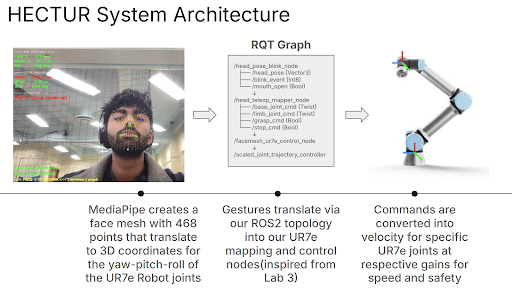
System architecture showing the complete pipeline from webcam input to robot control
↓
MediaPipe Face Mesh
↓
head_pose_blink_node
↓
head_teleop_mapper_node
↓
facemesh_ur7e_control_node
├── Joint Velocity Control → UR7e Controller
└── IK + Motion Planning → MoveIt → UR7e Controller
(d) Complete System Workflow
- Webcam captures user's face
- MediaPipe extracts facial landmarks
- Head pose, blinks, and mouth state are computed and filtered
- Gestures are mapped according to the active control state
- Commands are scaled and adjusted, computing IK if necessary
- Joint velocities are sent to the UR7e
- Safety commands are prioritized
- Robot executes motion or returns to savepoint/tuck position
4. Results
(a) Performance & Tasks
The system successfully:
- Controlled multiple UR7e joints using head gestures
- Switched control modes via blink detection
- Safely stopped and reset motion
- Toggled the gripper
- Returned to a saved pose or tuck position via mouth commands
- Helped the user perform simple common tasks like picking up objects and putting them in designated buckets
(b) Video Demonstrations
Final Presentation video for EECS 106a
Final Presentation video for EECS 106a
Planning Demonstrations
Showcasing planning with side-by-side video of head commands via FaceMesh and with robotic arm execution
Robotic arm movement: Side-by-side view of FaceMesh head commands and robot execution
Face commands for the arm: Side-by-side view of FaceMesh head commands and robot execution
5. Conclusion
(a) Design Criteria Assessment
Our final solution met the final criterion pretty well:
- Planning: We implemented a change post-presentation to our Planning requirement. By toggling your mouth opening, you are able to save a pose for the UR7e robotic arm, and when you toggle again, MoveIt is deployed to take in the current position of the robot and the saved waypoint, and undergoes an IK planner node to restore the arm to that saved pose.
- Sensing: Real-time tracking of 468 different points on a face mesh from a 2D frame converted into 3D commands. The MediaPipe FaceMesh program also has to encounter recentering for dynamic environments or camera setups via blink commands.
- Actuation: The actuation node sends ROS 2 messages in the Joint-Velocities space for the robotic arm to execute commands in a safe, smooth manner.
- Hardware: We utilized the UR7e robotic arm and a Logitech C922 Webcam.
(b) Post-Presentation Changes
Following the initial presentation, we implemented a significant enhancement to our planning requirement using MoveIt. We developed an IK planner that enables users to toggle a save mode, allowing them to save a checkpoint pose of the robotic arm. When the save mode is toggled again, the system uses MoveIt to compute the inverse kinematics solution and plan a trajectory to return the arm to the previously saved pose. This feature provides users with the ability to quickly return to important positions during manipulation tasks, reducing redundant movements and improving overall efficiency.
(c) Difficulties Encountered
Ideating a planning requirement due to the ambiguity of what was acceptable before the presentation did cause some confusion on our part for developing our planning node. In addition, we noticed slight errors in our extreme turns and nods for movement commands for the FaceMesh, as when you move to a point where your eyes are not tracked, it can cause an unintentional reset state.
(d) Flaws, Hacks, and Future Improvements
As mentioned in the previous question, we noticed shortcomings in the MediaPipe FaceMesh for extreme commands. What we would like to improve:
- Fine-tune the gains so that turns can correlate to fast velocities without causing excessively unsafe motor controls if outside our set safety bounds
- Look into finetuning the Eye Aspect Ratio (EAR) metric for maybe hindering such edge cases
- Look into different open-source CV models that can offer a more accurate 3D reconstruction and will not be as sensitive
- Include a headset with the webcam integrated (or incorporating a VR headset) for a more modular setup for real-life applications
- Fine-tune the facial regions of FaceMesh to account for more DOF without switching states (eyebrow movements, jaw twitching, etc.)
6. Team
(a) Team Members
Pranav Meraga
An Aerospace Engineering major interested in robotics and AI. He is well-versed in SolidWorks, embedded systems, and mechanical prototyping.
Loveveer Singh
An EECS major interested in robotics, AI/ML, and computer architecture. He has experience with Raspberry Pi and ESP32-based projects.
Jack Bian
A hobbyist engineer interested in mechatronics and practical robotics, with experience in fabrication and control systems.
Alan Li
An EECS major interested in robotics and computer vision. He enjoys working with automated robotic systems using perception and control.
(b) Major Contributions
Pranav Meraga
- Developed the idea from scratch and contributed mainly to the proposal
- Created the early structure and repository for the check-ins we needed to complete for the project
- Developed the early, non-ROS-based FaceMesh implementation for personal testing
- Relayed responsibilities to group members and coordinated equipment pickup and drop-off
- Developed the IK planner for our planning requirement
- Developed the entire slideshow presentation for our group and executed the demo
Loveveer Singh
- Contributed to the final repository and the majority of the codebase
- Deployed the system during live demos
- Lead implementation of the planning module for post-presentation updates
- Assisted in leading the project as well and structuring the entire repository/README for readability
Jack Bian
- Recorded live demos and assisted in the formulation of presentation slides
- Helped in ideation and troubleshooting during demonstration sessions
- Facilitated communication with course staff on project requirements
Alan Li
- Contributed to system design and additional feature ideation for the project
- Assisted with debugging and polishing irregular IK and motion planning behavior
- Documented design choices and software implementation for the final report
7. Additional Materials
- Code, URDFs, and launch files: Available in the repository
- CAD models: No additional hardware was manufactured
- Data sheets: UR7e and Logitech C922 specifications available from manufacturers
- Videos and images: Demonstration videos and screenshots included in Results section
- GitHub Repository: View on GitHub
Workspace Cleanup
After completing our project, we returned all equipment to UC Berkeley's ESG and cleaned up our workstation. We did not use any additional parts or make any changes to the workstation beyond our project requirements. Below is proof of our workspace cleanup:
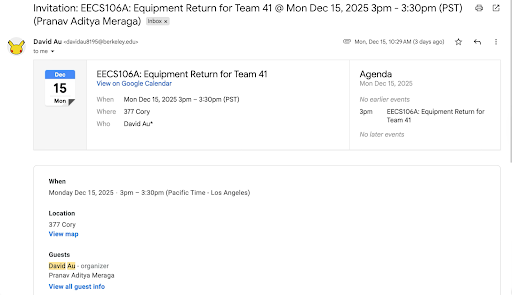
Proof of workspace cleanup after returning equipment to UC Berkeley's ESG. No additional parts were used and no changes were made to the workstation.
Peer Evaluations
Proof of completing peer evaluations for the project:
Proof of completing peer evaluations for the EECS 106A final project